Showing posts with label Editing Task. Show all posts

Sunday, 2 October 2016

The Woods Editing

The Woods editing task

As practise for editing when our groups record our footage, we where asked to look at the woods trailer (a trailer created by another A level group) and edit it to a teaser trailer. This evolved selecting the shots we wanted to use out of the three minutes of clips the full trailer had. This wound help use develop skills at editing so our actual film will look much more professional.

We started the editing by downloading 'The Woods' MP4 file off of YouTube. This aloud us to access both the moving image and the sound. With this file we imported into our writing software which is final cut and began editing the piece so it would be a teaser trailer and not a full trailer.  


We first looked at what shots we actually wanted in out teaser. Because we have already done research into teasers we realised that teaser trailers do not have to have a narrative. This was good for us because I liked the beginning 30 seconds of the clip. It was shot very well and the music also went in very well with it. This meant we could keep the beginning shots and then study the other shots to see what the last 30 seconds would be. After choosing the shots we wanted to select we used to cut tool to delete the clips we didn't want. As the whole thing was one big clip I used the blade tool to split the big 3 minute long trailer into multiple little ones like it actually would be when editing footage together.

After we got the new trailer to one minute screen time we had to make the new footage flow so it looked profession. This evolved us editing both sound and footage. When looking at the footage we had to make sure that the cuts weren't to jumpy unless we where trying to get the excitement across to the audience. We used the trim tool to make sure that the clips where of the right length and that they cut between each other in the correct way.

After making the footage flow correctly came the hardest part for me when it came to editing the trailer. This was making sure the sound worked effectively. This meant we had to do many of the things we did when editing the footage to the sound. We had to first detach the audio from the clips and then cut it with the blade to get selected sounds and backing tracks. Once we got all the raw sounds we needed we then had to finalise the audio. We found that at some points the music stopped to suddenly because of the way we had cut and mashed sounds together without using the footage that went with this sound. This meant we had to use some sound techniques to make sure it was professional. I used layering and also fades to create a good effect. We faded out the end of certain parts of the song and layered them over the start of others. This mean that they sound would not end abruptly. After getting all the sounds done we re attached the music and backing track to the video.

Once all of the sound editng and footage editing was done we asked other people in out media what they thought about the new pice. We were happy with the results and we got some good feedback on the piece. This will definatly help use when we edit our final piece.


Friday, 30 September 2016

Editing Task: The Woods

Editing Task: The Woods 

We were set the task of editing a 2:30 minute trailer by a previous A level media group named 'The Woods' and improving it by decreasing the amount of time so that it fits the description of a teaser trailer and so that all of the unnecessary footage or clips are taken out of the video. 


Firstly I started off by getting rid of unnecessary clips, and then matched them so that they still run in a fluid motion. I was abl
e to do this by placing the orange time marker just before where I want to cut, and then used the blade tool in order to shorten the clips.  
I chose to cut down the timings of clips such as this one as there was not a lot of action happening and therefore should not be used in the teaser trailer as it would not attract the viewer and may even make them bored. 
Next, i cut out parts of the credits that I viewed as unnecessary as a blackout screen at the end for about 10 seconds which was definitely not needed.. I used the blade tool again and shorten down the clips.
Due to us cutting and slicing the trailer, we realised that the sound didn't match up to the footage. In order to change this, I imported the full trailer and detached the audio and deleted the full trailer. 
I was then able to match up the sound correctly with the new clips. I had to shorten down edit the audio accurately for it to work well. As the trailer uses two different types of sound, I had cut out a lot of audio in the middle where the soundtrack changes and i then had to match them up. To do this i had to look at where the clip changed to be darker from the start which is when the music also changes. In order to make it work, I faded out the end of the first soundtrack and faded it in to the second one. Instead of the music becoming slower it now ends loudly which still works well as it crackles in time with the 'coming soon' appearing.
 

Wednesday, 28 September 2016

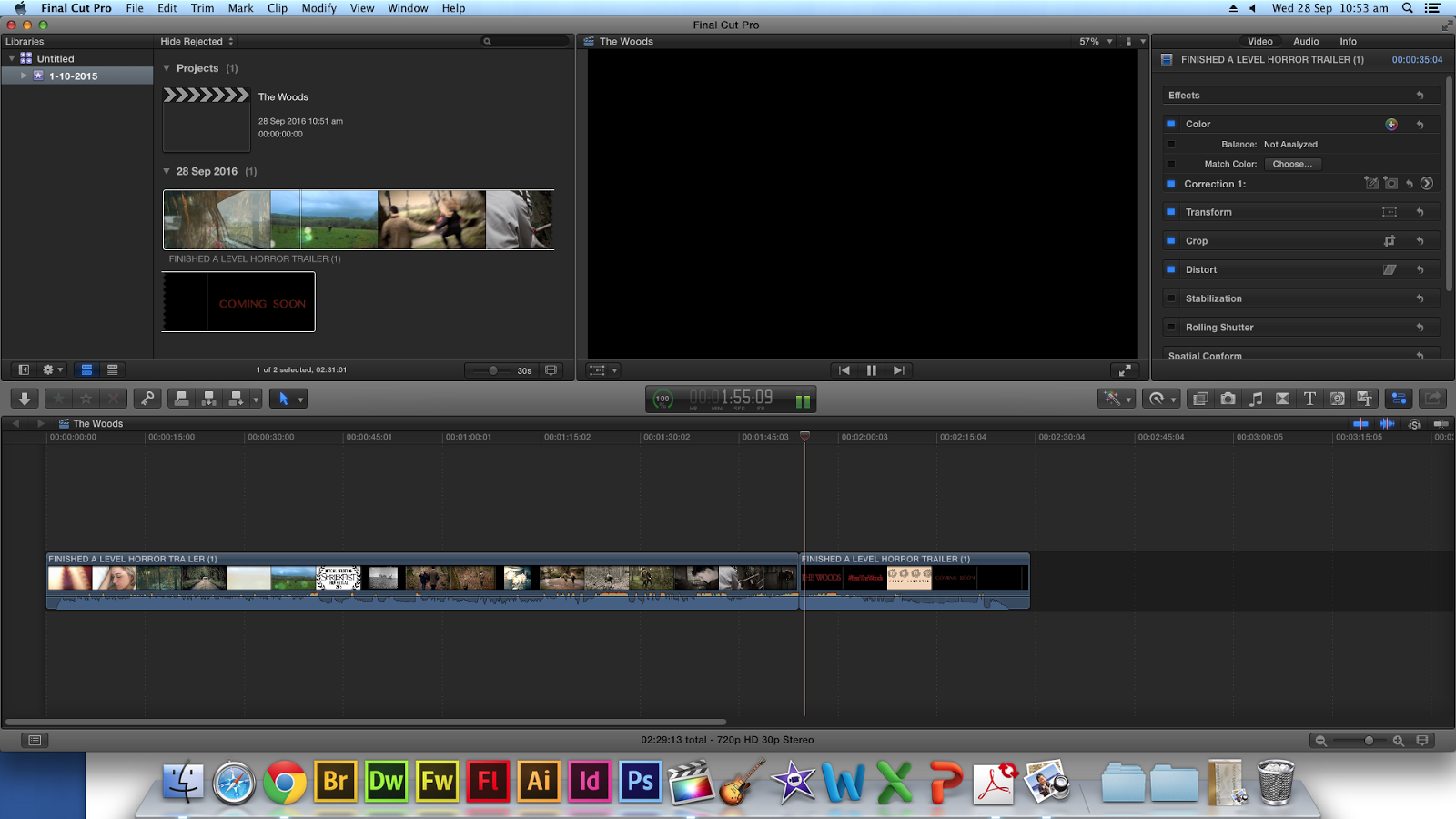
The Woods Editing Task

The Woods Editing Task

For our task we was asked to edit the teaser trailer we watched made by a previous A level group which was called The Woods. There teaser trailer was 2.31 which was quite a long teaser trailer our aim was to cut this down to about a minute getting rid of the useless footage. 


The first thing I did was shorten down clips which were too loud and didn't need to be, in some clips this was hard as it didn't match up right so had to make sure it was cut at the right time. I did this by choosing the bit where I wanted to cut then got the blade tool and shorten it to where I want it to be or how long I want it to be. I did this at the start of the trailer as most of the shots used at the start were nice and didn't need to delete completely.


Another piece of editing which I did was just delete certain bits of the trailer entirely. I did this by selecting the blade tool again so I was able to grab the clip which I wanted to delete where I then pressed delete. I did this to certain parts of the trailer as I felt like they weren't needed as it was repeated again later in the trailer. One of the clips I delete was of the characters in the chair not moving as it showed again later on of them moving in the chair.


Towards the end of the trailer when it showed the credits I cut out some bits of that, I didn't delete the clips entirely as they were needed for the trailer but some of them were quite long where the screen was black for quite a long time which wasn't needed. I used the blade tool again and shorten down the clips.


After I edited down the trailer I found that the sound didn't match up to the footage like it did before. To correct this I exported the sound from the clips and delete it, after I re added the whole trailer again exporting the sound out of it and deleting the trailer. I then was able to match up the sound correctly with the new clips which I had shorten down and edited.


However as the trailer uses two different types of sound and I had cut out a lot of the middle where the sound changes into the other I had to match it up correctly. To do this I had to look at where clip changed to be darker from the start which is when the music changes as well. I faded out the end of the first song and faded it in to the other. 


I had to lose a lot of the sound at the end due to the amount of footage which I had edited out. This meant that the end of the trailer showing the credits wasn't the same as the original as it wouldn't of matched up in time the music going slower as it was a shorter trailer. Instead of the music becoming slower it now ends loudly which still works well as it crackles in time with the 'coming soon' appearing.

By doing this task I was able to develop my editing skills further, this was by cutting down clips, adding clips in and sound. I will now be able to use the skills which I have learnt in our trailer when it comes to editing. For next time I will make sure I cut down the clips more precisely so they don't jump and glitch this is so that the trailer will run smother, I will also do a lot more research into the sound for ours so that it works perfectly with the footage.